CREATE
Express
Keep your own setup.
For developers who already have their tools. Scaffold or import any Rust or C++ plugin project, then build, install, cloud-sign and list it from one app.
FREE WITH A FREQLAB ACCOUNTMACOS · INTEL AND APPLE SILICONWINDOWS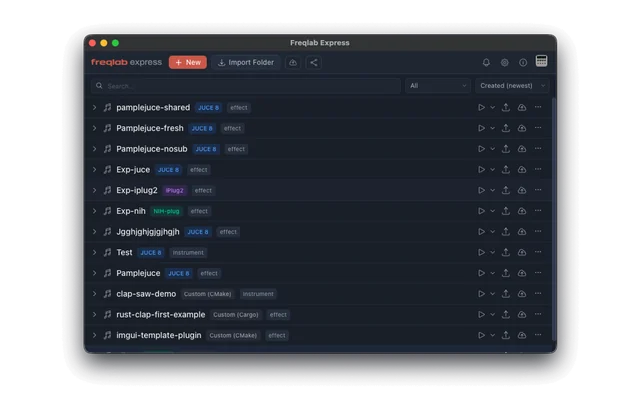
01 · YOUR TOOLS
Opens in what you use.
EDITORS
- VS Code
- Cursor
- Windsurf
- Antigravity
- Zed
- Sublime Text
- Xcode
- Visual Studio
- CLion
- RustRover
- Neovim
TERMINALS
- Terminal
- iTerm2
- Warp
- Alacritty
- Kitty
- Windows Terminal
- Command Prompt
- PowerShell
- Git Bash
- One searchable, sortable table of your projects. Filter by framework
- Open any project in your editor, your terminal or its folder, in one click
- Give each project an icon from the library or your own image, and a color for its row
- Dark, light or your own colors
02 · ANY PROJECT
Bring any project.
- Import any plugin folder in place. Express detects JUCE, iPlug2, NIH-plug or any Cargo or CMake project
- Clone from Git, submodules included, or pick from your GitHub repos
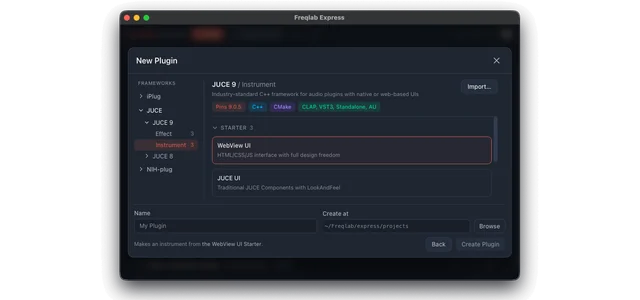
- Start new from the same templates as Studio, or save any project as your own template, shared with Studio
- Override build commands: configure and build commands, extra CMake or Cargo arguments, output folder, files to leave out of cloud builds
- Your own toolchain, with a safety net: if a project needs Xcode tools or Visual Studio Build Tools, Rust or CMake and you don’t have it, Express offers to install it
03 · BUILD AND SHIP
Build here. Ship everywhere.
- Local buildsOne click, with a live log and an optional desktop notification. Clean build and never-cache options for tricky projects.
- Into your DAWCopies your plugins into REAPER, Ableton Live, FL Studio, Logic Pro or any folder.
- CloudBuilds for Mac and Windows at once, as VST3, CLAP and AU, signed and notarized, using build credits.
- DistroSend a finished build to a new or existing product in a couple of clicks, and list it.
- Account in SettingsYour build credits, with a link to your seller dashboard.
04 · STUDIO OR EXPRESS
Which one is yours?
| Studio | Express | |
|---|---|---|
| WHO IT’S FOR | Anyone, from first plugin to pro | Developers with their own editor |
| AI AGENT CHAT | Claude Code, Codex, Gemini, OpenCode | No |
| CODE EDITOR | Full IDE built in | Opens your editor |
| HEAR IT IN THE APP | Live preview with meters | No, test in your DAW |
| VERSION HISTORY | Every change saved, plus full git | No, use your own git |
| TEMPLATES | Effect and instrument Starters | The same |
| IMPORT, WITH CUSTOM BUILD COMMANDS | Yes | Yes |
| LOCAL BUILDS AND DAW INSTALL | Yes | Yes |
| CLOUD BUILDS, SIGNING, NOTARIZATION | Yes | Yes |
| FREQLAB STANDARD CHECKS | On your computer and in the cloud | Cloud results |
| LIST ON FREQLAB.CO | Yes | Yes |
| SHARE AS ONE FILE | .freqlab.zip | The same format |
Showing Studio
- WHO IT’S FOR
- Anyone, from first plugin to pro
- AI AGENT CHAT
- Claude Code, Codex, Gemini, OpenCode
- CODE EDITOR
- Full IDE built in
- HEAR IT IN THE APP
- Live preview with meters
- VERSION HISTORY
- Every change saved, plus full git
- TEMPLATES
- Effect and instrument Starters
- IMPORT, WITH CUSTOM BUILD COMMANDS
- Yes
- LOCAL BUILDS AND DAW INSTALL
- Yes
- CLOUD BUILDS, SIGNING, NOTARIZATION
- Yes
- FREQLAB STANDARD CHECKS
- On your computer and in the cloud
- LIST ON FREQLAB.CO
- Yes
- SHARE AS ONE FILE
- .freqlab.zip
Change your mind later and nothing is lost: Studio opens the same projects, and both apps open each other’s .freqlab.zip files.
Keep your
editor.
MACOS · WINDOWS
FREE WITH A FREQLAB ACCOUNT
SIGN IN TO DOWNLOAD
FREE WITH A FREQLAB ACCOUNT
SIGN IN TO DOWNLOAD
Express is free.